

Sponsor Top-ups and Transaction Fees
Prerequisite: How Rent Sponsorship with Light Token works
Prerequisite: How Rent Sponsorship with Light Token works
Rent sponsorship is a built-in feature of the Light SDK’s that sponsors rent-exemption.
This is dealt with under the hood in a way that doesn’t disrupt the UX of what your users are used to with SPL-token.Rent-exemption: paid by a rent sponsor PDA.Top-ups: paid by the fee payer.The 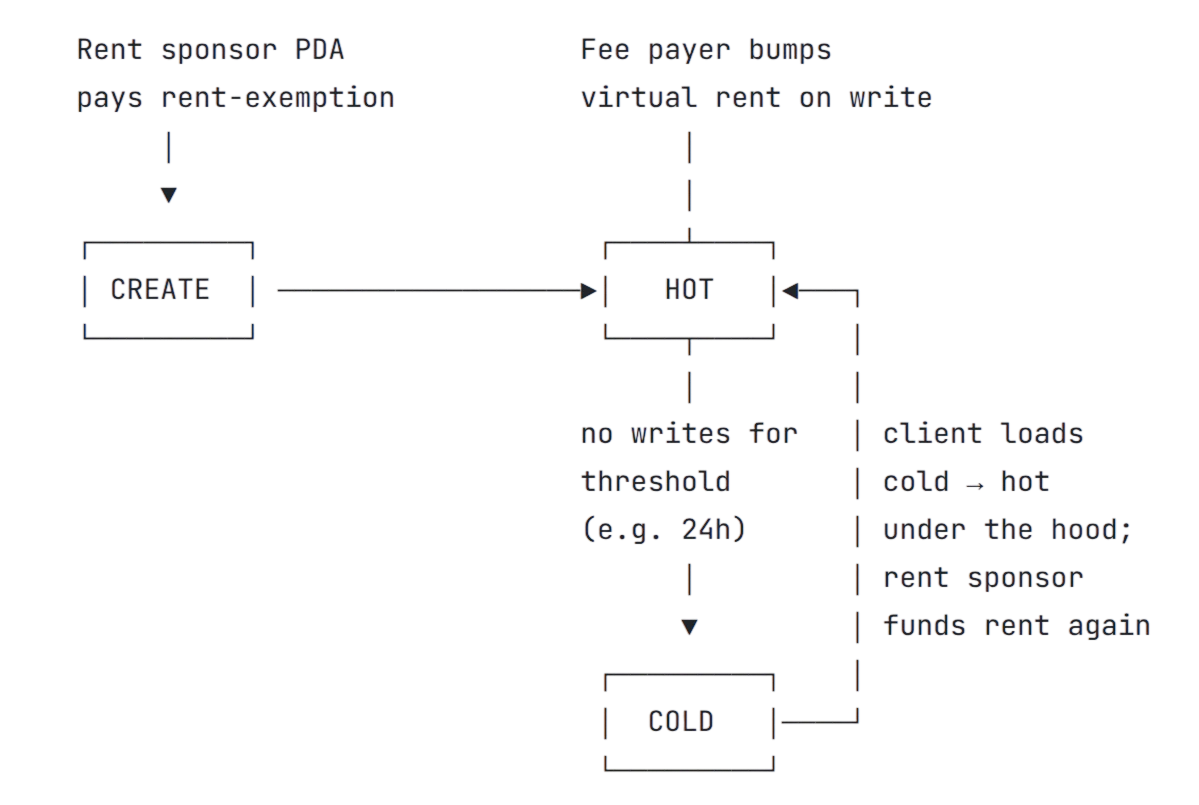
feePayer on the transaction bumps a small virtual rent balance (766 lamports by default)
on each write to keep the account active (hot balance).
Set your application as the fee payer so users never interact with SOL.Hot-Cold Lifecycle of Accounts.Accounts get auto-compressed (cold balance) when the virtual rent balance goes below a threshold (eg 24h without write bump).
The cold account’s state is cryptographically preserved on the Solana ledger.
Users only interact with hot accounts and load the cold balance in-flight when using the account again.payer parameter on any Light Token
instruction determines who pays rent top-ups in addition to transaction fees.
Set your application as the payer so users never interact with SOL.
In total, your sponsor covers three costs:
Technical Cost Breakdown
Technical Cost Breakdown
Send a gasless transfer
Find a full code example here.
- TypeScript Client
- Rust Client
- AI Prompt
1
Create a sponsor account
Generate or load a keypair for the sponsor who will pay transaction fees and rent top-ups.
The sponsor needs SOL but doesn’t need to hold the tokens being transferred.
2
Create the transfer instruction
Create the transfer instruction with the sponsor as
payer and the sender as authority.
The sender owns the tokens and must sign the transfer.3
Send with both signers
Both the sponsor and sender must sign the transaction:
Full example
Full example
Related guides
Verify payments
Query balances and transaction history.
Batch payments
Pack multiple transfers into one transaction.